

SmarTest Invigilate:
Remote Proctoring Software
SmarTest Invigilate is a next-generation remote proctoring software that combines advanced security features with ease of use to deliver a safe and reliable testing environment. Powered by artificial intelligence, a secure browser for exams, and additional smartphone-based camera feeds, SmarTest Invigilate sets the benchmark for the integrity and transparency of online proctoring services.

Our AI-driven proctoring features go beyond traditional invigilation, maintaining constant vigilance throughout every stage of the exam process. The integrated secure browser for exams provides an additional layer of protection, preventing unauthorised access and safeguarding assessment integrity during remote proctoring.


Record & Review
Utilising the same streaming as a live session, the reviewer then reviews recordings of the test being taken.
Record & Review Lite
Only potential infringements are recorded for minimal data storage
Online Proctoring Options
SmarTest Invigilate is the perfect proctor software for you, offering online proctoring options:
Live Remote Proctoring
Real-time proctoring and supervisor monitoring, with each session recorded and stored
Live Remote Proctoring Plus
A multiple mobile camera feature to support practical and shop-floor assessments
Live Remote Proctoring Lite
All the benefits of Live Proctoring without data storage
How to Implement Online Proctoring Software
Our online proctoring solution seamlessly integrates with most learning or assessment platforms through secure APIs. Choose from flexible live proctoring software modes including Live Proctoring, Record & Review, and Auditorium.
Invigilate was developed with both the test provider’s and candidate’s needs in mind. The security and integrity of the exam are central to its design, while usability and support ensure an effortless experience for test-takers. The intuitive interface supports the decision-making of professional proctors and is enhanced by AI-powered automated flagging, helping identify potential exam irregularities automatically. To accommodate a global user base, Invigilate includes a multi-language system consistent with our Examiner platform.
Seamless Monitoring Without Hassle
SmarTest Invigilate is designed to simplify online exams, removing the hassles and restrictions that often come with traditional platforms. Here’s what makes SmarTest Invigilate different:
Inefficient List Navigation
Large-page views and flexible filters allow instant access to the right person — no need to sift through endless pages.
Limited Proctor Visibility
Always know when a proctor is actively monitoring a test-taker. Our platform provides clear indicators to ensure everyone is aware of who’s on duty and who’s not.
Backup Proctor Limitations
No admin intervention is required — SmarTest Invigilate ensures smooth handovers without disrupting the exam or compromising integrity.
Single Test-Taker Monitoring
No more tab-switching — the dashboard allows simultaneous monitoring of all test-takers during remote proctoring sessions.
Missed Communications
Messages between proctors and test-takers are clear and immediate. Notifications are designed to be impossible to overlook, ensuring that communication remains consistent.
Incident Tracking Challenges
Proctors and administrators can record comments, flag issues, and review activities seamlessly, maintaining clear records throughout the remote proctoring process.
Comparison of Remote Proctoring Options
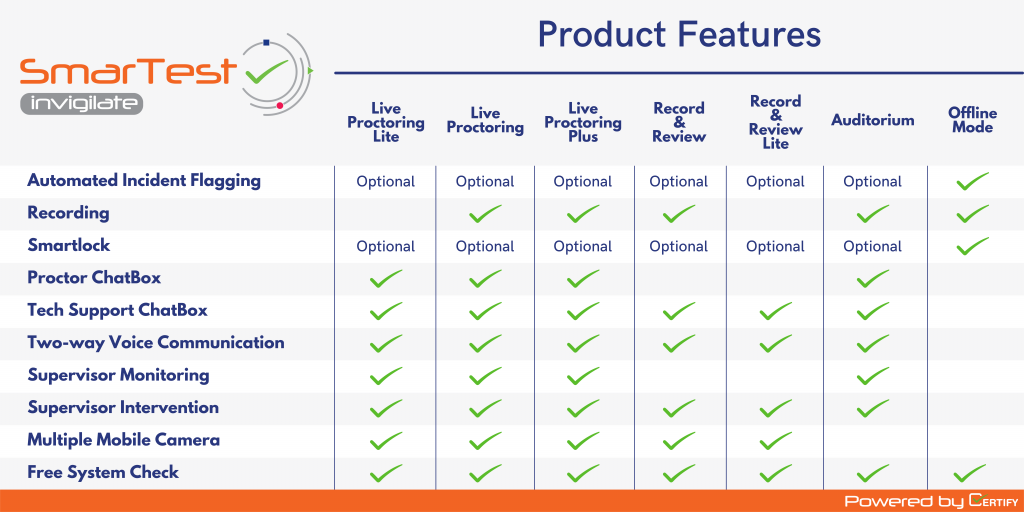
SECURITY TECHNOLOGY
Software Features
AI-driven monitoring detects suspicious behaviour such as lighting changes, unusual noises, or looking off-screen, allowing proctors to review flagged incidents.
AI-Driven Incident Flagging
Test-takers are monitored through an advanced AI proctoring system that automatically detects and flags suspicious behaviour — such as lighting changes, unusual noises, or looking off-screen. These features enhance cheating detection in online exams, allowing human proctors to review flagged moments afterwards.
Auditorium Mode
Designed for larger volumes of test-takers completing exams simultaneously. A dedicated team of proctors monitors the session in real time and can communicate with each other throughout, ensuring efficient coordination and consistent supervision — ideal for high-capacity remote proctoring or proctored testing centres.
Frequently Asked Questions
Remote proctoring is a digital method of supervising exams taken from different locations. It helps maintain the integrity and fairness of assessments by monitoring candidates through tools such as a webcam, microphone, and screen sharing. This ensures the exam conditions remain secure, even when participants are not physically present in an exam centre.
Most remote proctoring systems use a combination of video, audio, and screen monitoring. Advanced platforms also incorporate artificial intelligence to identify unusual actions, such as unexpected movements, background noises, or attempts to access unauthorised materials. When detected, these events are flagged for a human proctor to review.
Proctor software generally falls into three categories:
- Live Proctoring software – A trained supervisor watches the exam in real time.
- Recorded Proctoring (Record & Review) – The exam session is recorded and examined afterwards for possible irregularities.
- AI Proctoring – Automated systems monitor the entire session, issuing alerts based on detected behaviour patterns.
A remote proctor oversees the digital exam environment to ensure all rules are followed. They monitor the candidate’s webcam, microphone, and screen activity, respond to procedural questions where appropriate, and review any alerts generated by AI systems. Their role is to safeguard the exam and intervene if they observe potential breaches of regulations.
Online test proctoring typically relies on:
- A webcam for visual monitoring
- A microphone for audio supervision
- Screen-sharing tools to track on-screen activity
- Monitoring software capable of detecting unauthorised applications or behaviour
- These tools work together to recreate a controlled exam environment online.
Exam proctor software removes geographical restrictions, allowing candidates to take exams from any suitable location with a stable internet connection. It also supports both real-time and recorded monitoring, making scheduling more flexible for institutions and learners.
By combining live supervision, secure technologies, and AI-based detection tools, the platform prevents unauthorised assistance, blocks prohibited materials, and identifies suspicious behaviour. This ensures that all candidates are assessed under consistent, equitable conditions.
Location: In-person exams require a physical exam centre; remote exams can be taken from anywhere.
Tools: In-person relies on direct observation; remote uses webcams, microphones, and software monitoring.
Automation: Remote systems may use AI for detection, while in-person supervision is entirely human-led.
Recording: Remote exams can be recorded; in-person sessions generally are not.
